
Someone is standing on Fayetteville Street, or Glenwood, or a Wake Forest sidewalk. They are hungry. They pull out a phone and type a search.
They will not read three pages. They will pick the first restaurant they can understand in a few seconds. Here is how to be that restaurant.
Why do hungry searchers pick the first restaurant they can read on a phone?
Because hunger has a deadline. A diner searching from the street wants three things: what you serve, whether you are open, and how to get there.
If your listing answers all three, they walk in. If it makes them pinch, scroll, or download something, they tap the next result. Or they open a delivery app, and now you are paying a commission on a customer who was standing near your door.
Nothing about this is clever. The restaurants that win walk-in traffic are the ones that are easy to read in one hand, in bad light, in a hurry.
What does Google need to see to put your restaurant on the map?
If you are wondering how to get your restaurant to show up on Google Maps in Raleigh, start with what Google is actually trying to do. It wants to send a person to a place that is relevant, nearby, and trustworthy.
You cannot move your building. You can control the other two:
- Relevance: your profile and site clearly say you are a restaurant, what kind, and what you serve.
- Trust: your information agrees everywhere it appears, and real customers have said good things.
Trust is mostly boring consistency. Google checks your profile against your website and other listings. When they agree, it can be confident. When they argue, it hedges.
Does your Google Business Profile match your website down to the hours?
Open both right now. Compare them line by line.
- Business name, spelled the same way
- Street address, suite and all
- Phone number
- Regular hours
- Holiday and special hours
- Menu link
Hours are where restaurants slip. The profile says 11 to 10. The site footer says 11 to 9. The Facebook page says something from 2022. A diner who drives over and finds a dark window does not blame Google. They blame you, and they leave a review.
Pick one source of truth. Update everything from it. Do it again every time hours change, including the week of every holiday.
Why should the menu be a page, not a PDF or a delivery-app link?
A PDF is a document built for a printer. On a phone it loads slowly, zooms badly, and tells search engines very little.
A delivery-app link is worse for a different reason. It sends your most interested visitor to a platform that is happy to show them your competitors next door.
A menu page fixes both. Real text, real headings (appetizers, entrees, drinks), real prices if you are comfortable with that. It loads fast, it reads cleanly on a small screen, and a search engine can see that you serve the dish someone just typed.
Yes, it is more work than uploading a file. It is also the single most useful page on your site. Our restaurant website design work treats it that way.
How do you name the neighborhood and town you actually serve?
Say where you are, in words, like a person would.
"Tacos in North Hills." "Brunch near Moore Square." "Dinner in downtown Wake Forest." Those phrases belong on your home page, your about copy, and your footer, written naturally and not stuffed in a list.
Why it matters: people search by place. They type the neighborhood, the town, or "near me," and Google matches that against what your pages say. If your site never names the area, you are asking the search engine to guess.
Be honest about it. Name the places you really are and really serve. Do not claim ten neighborhoods you have never worked in.
What photos and posts help a restaurant profile earn taps?
Photos of food. Real ones, from your kitchen, taken in decent light.
Diners judge a plate before they read a word. A profile with sharp pictures of your best dishes, your dining room, and your front door (so they recognize it from the curb) earns more taps than a profile with a logo and nothing else.
A few habits that help:
- Add new photos regularly, not once in 2019.
- Show the entrance and the sign.
- Use the Posts feature for specials, events, and seasonal menus.
- Reply to reviews, good and bad, like a person who runs the place.
None of this is a trick. It is a restaurant behaving like it is open for business.
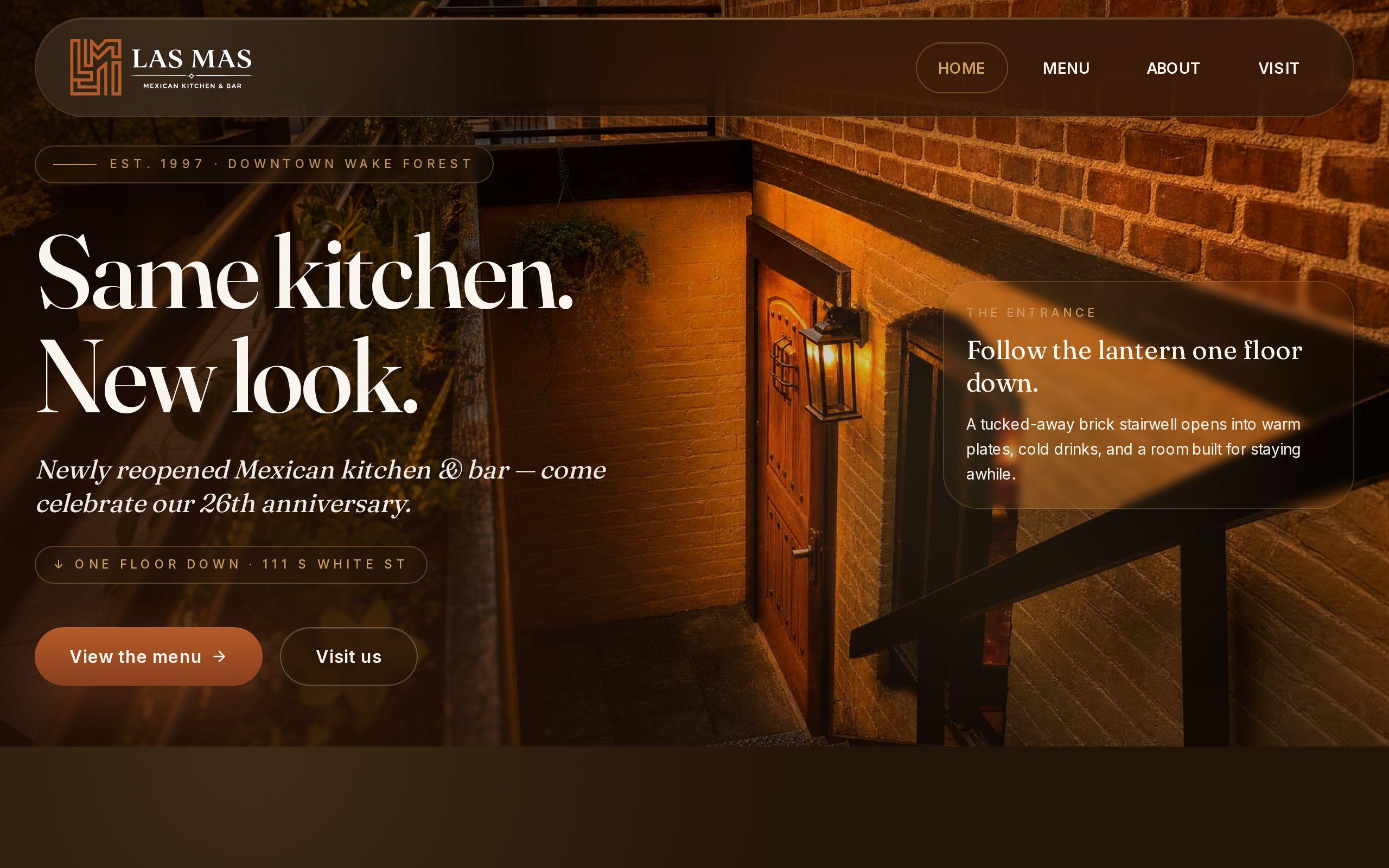
How did a 25-year Wake Forest restaurant keep menu, hours and location one tap away?
Las Mas Mexican Kitchen & Bar has been in downtown Wake Forest for twenty-five years. That earns a reputation. It does not earn a website that works on a phone.
When we built their site, the question was simple: what did a hungry visitor come here for? Menu, hours, address. So those went within one tap of every screen. Not buried in a menu of menus. Not on page four.
Food photography does the selling, because a good plate beats an adjective. The family story runs through the whole site instead of hiding on an about page nobody opens. And the build was tuned for the local search and mobile behavior that drives walk-in traffic to a downtown restaurant.
You can see how it came together in the Las Mas case study. The lesson is not a trick. It is discipline: answer the question fast, and say the same thing everywhere.
What can you fix this week without hiring anyone?
Block out an afternoon. Work down this list:
- Check that your Google Business Profile hours, phone and address match your website exactly.
- Set holiday hours for the next two months.
- Replace the PDF menu with a text page, even a simple one.
- Add your neighborhood and town to your home page copy.
- Upload ten recent photos of food and the front entrance.
- Answer every unanswered review.
That list will do more than most paid tactics. If you want a second set of eyes on the deeper local SEO work, our SEO and analytics team is happy to look.
Your next step
Pull up your own site on your phone, standing outside if you can. Start a timer. See how long it takes to find tonight's hours and the menu.
If it takes more than a few seconds, you know where to start.